

Localization and module-content profile
This profile is normative for the Fraktal generic HMI. It extends the data-driven contract without adding station-specific screens. The PLC publishes stable keys and structured values; the HMI owns human language, formatting, documents, and view policy.
1. Design boundary
Section titled “1. Design boundary”Operator-facing prose shall not be authored in PLC logic. Every displayed PLC field (diagnostic, alarm, release condition, interlock/permissive, command label, sequence step, decision prompt/option, safety-device description, hardware description, and I/O description) carries an immutable localization key:
std.<area>.<meaning>is owned by the Fraktal standard and is translated in the standard catalog.project.<area>.<meaning>is owned by the machine/project and is translated in the project catalog.
Keys are contract identifiers, not English fallback sentences. Renaming a key is a schema change. The HMI shall display the unresolved key conspicuously when no fallback exists; silently displaying an empty string is forbidden.
The following remain untranslated machine data: OPC UA browse names and paths, module instance names, model/order/serial identifiers, user names, raw device payloads, addresses, protocol commands, filenames, and engineering units. The HMI localizes the labels around those values and formats dates, times, and numbers using the active locale. Device reply data that helps diagnosis is carried as a structured value alongside a message key; it is never concatenated into translated prose in the PLC.
The ReasonCode remains the stable numeric diagnostic identity. Description is now a
localization key rather than fallback prose. Structured context (SourcePath, current
step, awaited module/condition, timestamps, and measured values) remains separately
published so translations never need to parse a PLC-built sentence.
2. Catalog composition and fallback
Section titled “2. Catalog composition and fallback”For an active locale, resolution order is:
- the matching scope’s override CSV;
- that scope’s shipped/source-language default;
- the shipped English/source default;
- the unresolved key.
Standard and project keys stay in their owning files so upgrades cannot silently shadow each other. Runtime UI source strings are also routed through the catalog; new code should use semantic keys rather than generated compatibility keys.
Catalog CSV files use UTF-8 and this exact header:
schemaVersion,scope,locale,key,valueschemaVersion is currently 1; scope is standard or project; locale is a BCP
47 language code enabled by the HMI. RFC 4180 quoting is used for commas, quotes, and
newlines. Import shall validate schema, scope, locale, key prefix, duplicate keys,
and row shape before replacing the selected override. A failed import leaves the prior
catalog intact. Export produces one standard file and one project file per language.
3. First-run and administration
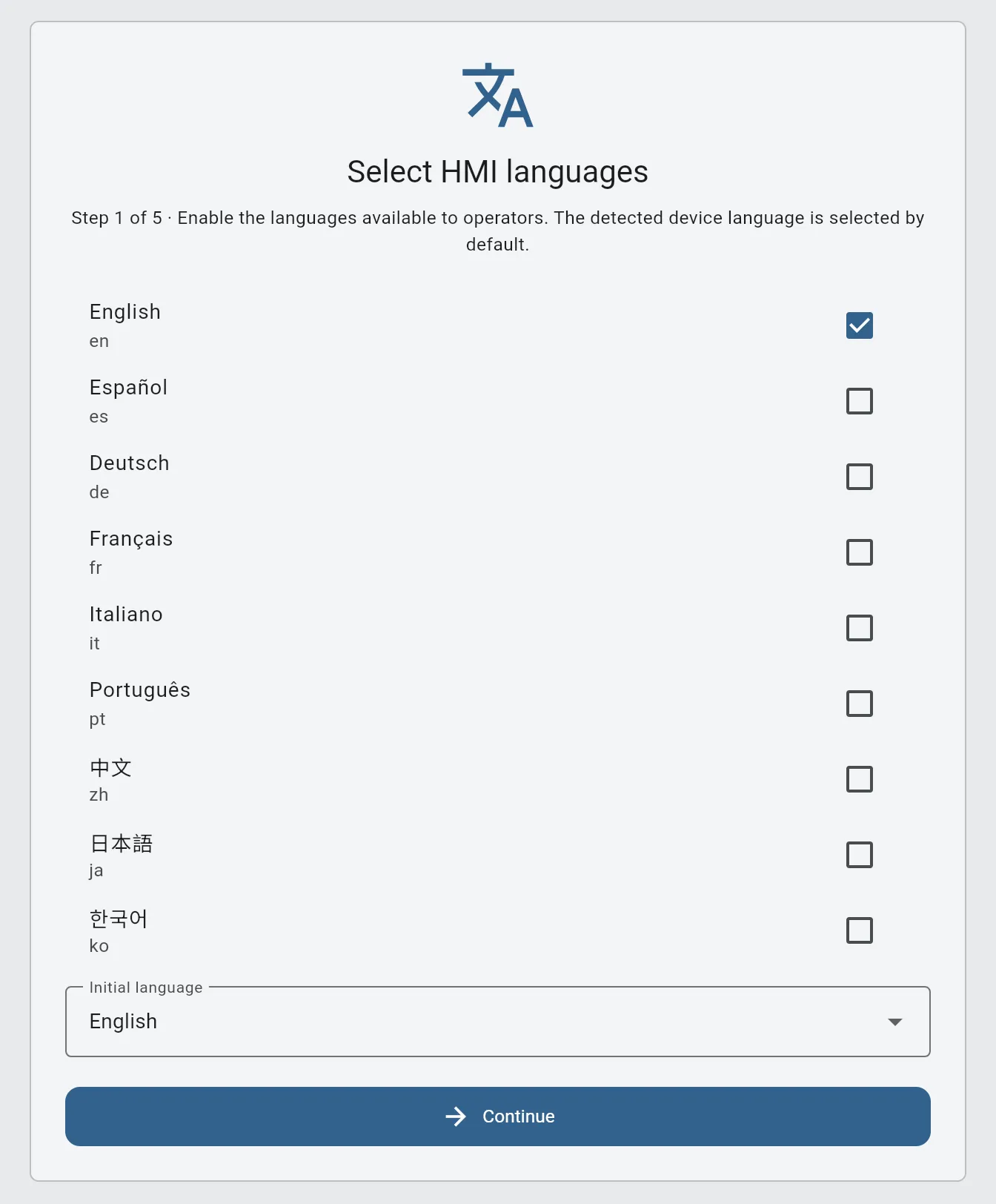
Section titled “3. First-run and administration”Before connection configuration, first run presents the supported languages. The device language is enabled and selected when supported; English is the fallback. The user may enable several languages and choose the initial language. This choice is stored locally with connection settings. Operators can switch among enabled languages without reconnecting.
a1163c7 · try itAn authenticated administrator can later import/export the two CSV scopes for any enabled language. Catalog changes apply immediately. Adding or removing the set of enabled languages is an administrative deployment setting; it does not alter PLC data.
4. Module information and documents
Section titled “4. Module information and documents”Every discovered module may publish a DisplayNameKey and DescriptionKey. The module
detail renders an Information section from those keys. Missing descriptions use the
standard std.module.noDescription key.
Any module may have zero or more PDF documents (manuals, wiring diagrams, setup guides,
maintenance procedures). An Engineer or Administrator may upload a PDF; an
Administrator may delete it. Each record contains module path, stable document ID,
filename, localizable title key and source-language title, uploader, UTC timestamp, and
PDF bytes/content reference. Upload validates the %PDF- signature and deployment size
limit before committing. PDF binaries never enter PLC memory or recipe data.
The shipped store is device-local (atomic JSON generation plus last-known-good backup
on native platforms, IndexedDB on Web) and is suitable for commissioning/single-HMI
use. An older Web localStorage record is migrated into IndexedDB on first load. A
production multi-HMI deployment
should replace the ContentStore adapter with an authenticated shared document
service/object store, keyed by stable asset/module identity and providing integrity
hashes, backup, malware scanning, retention, and audit. Browser quota makes large local
PDF storage inherently deployment-dependent.
5. Per-module section access
Section titled “5. Per-module section access”The standard sections are Information, Operations, Diagnostics, Configuration,
Documentation, and History. Each module path has an HMI policy giving the minimum
AccessLevel for each section. Defaults are:
| Section | Minimum level |
|---|---|
| Information | Open (NONE) |
| Operations | Operator |
| Diagnostics | Operator |
| Configuration | Engineer |
| Documentation | Operator |
| History | Technician |
Only an Administrator edits these thresholds. Engineer and Administrator may upload documents even when ordinary document viewing has a lower threshold. The policy is local HMI presentation control and defense in depth; it is not confidentiality, because published OPC UA data can be read by another client. If a section contains sensitive data, the OPC UA server or gateway shall enforce read authorization. Every write remains independently release-gated and rechecked by the PLC.
6. Tab layouts and guided content
Section titled “6. Tab layouts and guided content”Every module has Overview and Description tabs; category capabilities may add standard Motion, Vision, Code Reader, or RFID tabs. An Administrator may change the minimum view level of every tab and may add custom or Unit-guidance tabs. Custom controls use the same catalog resolver as the built-in HMI: their source title, label, and text are stored in the layout, and translated overrides remain in the standard/project catalog. Identity, engineering units, paths, and raw device results remain untranslated per §1. Custom/guidance tabs use a portable icon preset. The Overview layout may include an embedded module image with aspect-ratio fit, alignment, and margin settings. Control bindings are selected with autocomplete from compatible scalar OPC UA values owned by the current module; charts may select up to eight numeric series.
Every bound tag retains OPC UA quality, runtime type, and timestamps. Bad/Uncertain bindings remain in the layout but render unavailable, do not generate trend samples, and cannot enable a configuration write. Controls use responsive quarter/third/half/ two-thirds/full width presets in a wrapping flow layout and may be drag-reordered in edit mode.
Editing uses an HMI-local draft. Mutations and undo/redo never alter the published
operator layout. Publish validates the complete draft, stores the previous layout as
a revision with administrator/time/change-note metadata, then atomically makes the new
layout visible. The store retains at most 20 revisions per module. Restore is itself a
publish operation: it saves the layout being replaced before activating the selected
revision.
Guidance tabs bind to CurrentStep.StepNo and/or CurrentStep.StepName. * is reserved
for generic WAIT_OPERATOR guidance. The HMI displays guidance; the PLC sequence owns
the wait and the typed decision/condition that releases it. A local layout cannot make
an instruction into a safety acknowledgement or a PLC completion condition.
7. Faceplates, containers, and bound presentation
Section titled “7. Faceplates, containers, and bound presentation”Section 6 describes a layout owned by one module path. That scope does not survive a
real station: twenty identical clamps need twenty layouts, and a correction is twenty
edits. A layout is therefore authored against a module type and instantiated for
every module of that type, which is the same self-description the generic HMI already
renders from — a module is found by Status/ModuleType, so the type is available
before any layout is resolved; §7.1 says what a type is. A path-scoped layout remains available as an
override for the one press that genuinely differs, and resolution is
type-then-override with the override replacing the type layout entirely rather than
merging into it. Partial merge is excluded deliberately: a half-inherited layout is
not reviewable, because nothing on screen says which half came from where.
7.1 What a type is
Section titled “7.1 What a type is”Status/ModuleType distinguishes a Unit from an Equipment Module from a Control
Module. It does not distinguish a clamp from a door, and the press publishes three
instances of one declared cylinder under three different display names, so neither the
coarse enum nor the instance name identifies what a faceplate is authored against.
A module therefore publishes a type key alongside its display name key: a stable
identifier in the project.moduleType.* namespace, resolved through the catalogs of
§2 like any other key. A type the Fraktal standard library ships takes
std.moduleType.<type> instead, by the same ownership rule as every other key (§1).
A type key carries no .name suffix: that suffix belongs to the display name key. Static text belongs to the front end’s dictionaries rather than
to PLC values (§1), and a type is named the same way — the controller publishes the
key, the HMI owns the prose, and the type name is translated with everything else.
The type key is an identifier first and a display key second. Every instance of a
type publishes the same key; two types never share one; and renaming it is a breaking
change that re-scopes every faceplate authored against it, exactly as renaming a type
would be. A module that publishes no type key falls back to the coarse ModuleType
scope, which is the behaviour before this section existed.
Because the key is a vocabulary entry rather than a controller construct, a faceplate
authored against project.moduleType.pneumaticCylinder applies to every station that
declares that type — across bindings. A TwinCAT press and an Allen-Bradley press whose
cylinders declare the same type key share one faceplate, which is the platform-neutral
claim of the standard applied to presentation rather than only to the data contract.
7.2 Containers
Section titled “7.2 Containers”A view places controls in a container, and two container kinds exist because the two jobs have different geometry.
A grid container divides its width into a fixed column count and places each control at a column/row origin with a column/row span. Geometry is expressed in fractions of the container, never in pixels, so the same layout is correct on a 10” desk monitor and a 21” cabinet panel — the rule §6 states for flow layouts, restated for placement. A layout may declare per-breakpoint variants keyed to the operator control-scale presets; a view without variants is scaled rather than reflowed.
An overlay container places controls as a percentage of an image’s own box, and
exists because a grid cannot hold an annotation onto a picture. A cell is a fraction
of the container; when an image letterboxes inside a container of a different aspect
ratio, the cell no longer covers the thing it annotated, and an indicator that has
silently moved off its sensor is worse than no indicator. Overlay coordinates are
therefore relative to the image, and the image’s intrinsic aspect ratio is part of the
stored layout. The image travels embedded in the layout, so its aspect ratio is stored
with it and is not recorded a second time; positions are fractions of the box the image
is actually painted in after fit, alignment and margins, including the part a cover
fit crops away.
Controls in either container carry a z-order and may belong to a named layer. Layers are show/hide sets, not stacking — a maintenance overlay, a set of sensor identifiers — and a layer’s visibility may itself be bound, so one condition reveals or hides a whole annotation set.
7.3 Bound presentation
Section titled “7.3 Bound presentation”A control property may be bound rather than fixed. A binding names a source — a compatible scalar owned by the module, as §6 requires of every binding — and a transform that maps the source value onto the property. The transform set is bounded: comparison against a constant, a range-to-token map, an enum-to-token map, and boolean inversion. An expression language is excluded. It would be a surface nobody can review, a cost nobody can bound on a display holding two hundred indicators, and a second place where station behaviour is defined.
Bindable properties are visible, enabled, colour token, blink, icon, rotation,
fill level, opacity, and layer membership. Enumerating conditions as individual
features — a visibility flag, then an enable flag, then an editable flag — produces a
fourth request for every third delivered; one mechanism over a declared property set
does not.
A bound visible or enabled is presentation, never enforcement. The PLC remains
authoritative for access, releases, interlocks, and acceptance per §6 and Core §7.6/§7.7,
and it re-checks every request whatever the screen showed. A layout that hides a
button has not removed a capability, and a station whose interlock is a visibility
binding has no interlock. This is stated because this is the feature that invites the
mistake.
Authored colour selects a semantic token — the ok/warning/info/severity/state vocabulary the shipped themes already resolve — and never a literal colour. A literal walks straight out of the contrast guarantees the themes are measured against, and an operator-authored shade that is legible on the theme it was drawn in is not legible on the other twenty-four. Tokens keep authored content inside the same measurement as built-in content.
A view declares a binding budget. Every bound property is a read, and a display holding several hundred of them degrades the session that renders it, so the budget is part of the layout and refused at publish rather than discovered on the panel. Charts keep the eight-series limit of §6. Until a view declares its own, the standard budget of 200 bound reads per view applies; a declared budget may lower it, never raise it.
7.4 Display class
Section titled “7.4 Display class”Every view declares a class, and the authoring rules tighten with it.
An operating view is a primary production display. Colour is reserved for abnormal conditions, authored content uses semantic tokens only, decorative imagery is refused, and the contrast requirement is enforced at publish. A maintenance view permits the overlay container and photographic or rendered imagery: locating a sensor on the real machine is a maintenance task, and a render serves it better than a schematic. An engineering view is unrestricted, for commissioning and diagnosis.
The class is declared by every view an author can put a picture on — the Overview and every custom view. The fixed views of PLC data are operating views and declare nothing. A view stored before it could declare a class takes maintenance if it carries an image and operating if it does not, so no stored layout becomes invalid and the class is still always shown.
The distinction follows the industrial-HMI practice the display hierarchy already reflects, where realism on a primary operating display adds visual noise without information and measurably delays detection of an abnormal condition. It is a statement about where an image belongs, not a prohibition on images.
A view’s class is visible on the view and recorded in the exported profile, so a maintenance display standing in as an operating screen is apparent to anyone at the panel and auditable afterwards. A class that could be claimed silently would be claimed silently.
7.5 The station tile
Section titled “7.5 The station tile”The plant overview is the top of the display hierarchy, and its purpose is comparison across stations at a glance. Its tile geometry is therefore fixed — identity, state, a bounded set of metric slots, a bounded set of badge slots, and the first-out or step line — while the contents of each slot are type-authored from the same binding and token vocabulary as any other view.
Per-tile freedom is refused for the reason the level exists: tiles that differ in layout cannot be scanned as a set, and an operator comparing twelve stations is reading position as much as value. The fixed geometry also bounds the read cost of the one screen that renders every station at once. A tile is an operating view by definition and carries those rules whatever class its module’s other views declare.
8. Portable customization profile
Section titled “8. Portable customization profile”The HMI customization JSON is a complete portable backup of persistent
administrator-owned presentation state. It contains module documents, section and tab
access thresholds, tab/control definitions, tab icon choices, OPC UA binding lists,
embedded control/Overview images and layout, guidance triggers, and the
standard/project localization overrides, and bounded module-layout revision history.
Customization schema 4 adds revision history, action confirmation, and responsive
control widths while retaining schema 1–3 import compatibility. Import validates size, schema, duplicate IDs,
enum values, binding cardinality, chart bounds, document signatures, image payloads,
and catalog shape before merge. Imported IDs/keys update their matches; target-only tabs, documents,
policies, and localization overrides are preserved.
Customization schema 5 adds the §7 material: the type scope a layout is authored
against, container geometry and per-breakpoint variants, layer membership and z-order,
property bindings with their transforms, the declared view class, the binding budget,
and the station-tile slot assignments. A schema 4 profile imports unchanged and is
read as a path-scoped layout in a grid container of one column, which is what a flow
layout is; no authored content is discarded to obtain the new scope. Export is schema
5 once any §7 construct is present and remains 4 otherwise, so a profile that uses
nothing new stays importable by an older HMI.
Project structure drift is not file corruption. Import reconciles an old module path to the current live forest only when the match is deterministic: exact identity, mapped-parent plus identical local name, or one unique longest dotted suffix. It never guesses between duplicate local names. Unmatched/ambiguous profiles remain stored at their source paths as deferred content instead of aborting the rest of the import or being deleted. The completion report lists exact, remapped, and deferred paths so commissioning can review every decision. A later import or the module’s return can make deferred content active.
Connection/bootstrap configuration is intentionally separate and is never exported:
endpoint, transport, EverConnected, selected Unit scope, credentials/session, enabled
languages, and active language remain local to the target HMI. This makes a profile
portable between Windows, Linux, Android, and Web deployments without accidentally
redirecting the target to the source PLC. Imported localized text applies immediately.
9. Plug-and-produce consequences
Section titled “9. Plug-and-produce consequences”Adding a module type requires no HMI screen. It contributes stable standard/project keys, optional description/document metadata, and the existing typed facets. Catalog coverage is lintable: production PLC code may contain key literals, protocol data, and identities, but no operator prose in displayed fields. A commissioning export supplies the complete standard and project translation worklists before acceptance testing.
Built from Specification/LOCALIZATION_AND_MODULE_CONTENT.md at revision a1163c7 of the Fraktal repository.