

fraktal-hmi — Generic Operator HMI (Flutter, Material 3)
Implements HMI_CONTRACT.md / Core §3.13: the client is generic — it walks the
module forest and renders it; a station adds zero HMI code.
Manual-command cards include read-only Inputs/Outputs from each module’s exact published I/O assignment, with localized descriptions, quality and diagnostics. The industry-inspired theme uses circular white arrows (input down, output up), green and light red active fills, and gray inactive fills. Its multicolor top strip remains. Visible cards demand only their channels and ancestor bus health.
Path-capable transports apply read tiers before the first station sample, so closed history views do not cause a full-tree startup read. Manifest metadata uses discovered array row paths when the transport publishes a compact array form. The sequence chart therefore joins static titles/numbers, live cursors, and on-demand history/notes across TwinCAT and Siemens publication forms. The native TIA integration uses the same repository and chart without station-specific UI code.
Platforms
Section titled “Platforms”One codebase for Windows, Linux, Android, Web. Platform folders for windows and web are generated; add the others as needed:
flutter create . --platforms=linux,android # adds the remaining platform foldersflutter run -d windows|linux|<device>|chromeThe UI remains repository-driven and dependency-light. Flutter’s SDK localization
delegates provide locale-aware widgets; file_picker supplies cross-platform CSV/PDF
open/save dialogs, pdfrx supplies the embedded cross-platform PDF viewer, and the
Flutter-published cupertino_icons asset completes its platform controls. Versions
are pinned in pubspec.lock. (analysis_options.yaml remains self-contained.)
Windows plugin builds require Windows Developer Mode because Flutter creates plugin
symlinks (Settings > System > For developers).
Localization and module content
Section titled “Localization and module content”First run now precedes connection setup with language selection. The detected device
language is enabled by default; operators can switch among enabled languages. An ADMIN
can import/export a UTF-8 CSV for each language in two independent scopes: Fraktal
standard strings and project strings. Every UI Text path resolves through the runtime
catalog, while PLC-facing display fields are stable std.*/project.* keys.
Each module detail has a localizable Information section and optional PDFs. ENGINEER or
ADMIN can upload, ADMIN can delete, and ADMIN configures the minimum access level for
Information, Operations, Diagnostics, Configuration, Documentation, and History. The
shipped content store is local; production fleets should supply a shared ContentStore
adapter as specified in Specification/LOCALIZATION_AND_MODULE_CONTENT.md.
Transport per platform: the UI binds only PlcRepository (lib/data/plc_repository.dart).
SimRepository: full live demo everywhere.- Windows: native open62541 1.4.12 client through a small C ABI and a dedicated Dart worker isolate, or the WebSocket gateway client.
- Linux/Android native HMI: the WebSocket gateway client is implemented; the same direct OPC UA C ABI is source-compatible where its runner packages the native library.
- Web:
WebGatewayOpcUaClientimplements the same snapshot/write session over the versioned Fraktal WebSocket gateway protocol.
The gateway builds as a headless Windows or Linux package from gateway/. It
can also serve the exact compiled Web HMI from the same loopback listener, so
the browser page and /fraktal use one origin without a separate static server.
Windows packages a tray/startup installer; Linux packages a systemd unit. The
gateway process still runs independently from the operator UI and can own a
dedicated service identity. One process serves one PLC: a host with several
controllers runs one instance per PLC — its own folder under
%LOCALAPPDATA%\Fraktal\Gateway\instances, its own loopback port and published
origin, supervised together by the tray (Linux: fraktal-gateway@<name>). See
gateway/DEPLOYMENT.md and
../../Specification/Guides/WEB_HMI_GATEWAY_DEPLOYMENT.md.
See Specification/OPCUA_TRANSPORT.md for the ABI, snapshot schema, gateway
messages, security boundary, and acknowledged PLC mailbox.
Connection startup
Section titled “Connection startup”The operator shell is fail-closed behind ConnectionBootstrap:
- first use, corrupt settings, or settings that have never reached
LIVEopen step 1 of the connection wizard; - after the endpoint is live, step 2 discovers root Units and requires the local HMI assignment;
- the assignment filters the module/fieldbus views and rejects writes outside its root paths;
- an authenticated ADMIN can edit the Unit assignment later; missing saved paths reopen step 2 fail-closed;
- a previously proven connection starts on a full-screen Connecting to PLC view;
- no module controls are built while the link is connecting, stale, or down;
- after 30 seconds without
LIVE, Edit connection settings becomes available; - losing a live link immediately returns to the blocking screen; writes are not queued;
- native settings are stored as JSON under the user configuration directory; Web uses browser local storage.
The built-in simulation is selectable in the wizard. The production endpoint
on Windows/Linux/Android is an authenticated wss:// Fraktal gateway. A Web
release opened from the packaged gateway automatically derives same-origin
ws://.../fraktal or wss://.../fraktal; browsers cannot open raw OPC UA TCP. A
Windows opc.tcp://host:port connection remains available as a conspicuously
logged Anonymous/None exception for local commissioning, troubleshooting, or a
physically isolated PLC. For same-host commissioning, start the packaged
service explicitly in commissioning-anonymous and use
http://127.0.0.1:8080/. Chrome debug keeps the explicit
ws://127.0.0.1:8080/fraktal development endpoint. Remote clients use an
authenticated TLS reverse proxy as described in gateway/DEPLOYMENT.md.
Native WSS deployments can supply a device mTLS certificate/key, optional plant
Web CA, or a bearer token through the protected FRAKTAL_WSS_* /
FRAKTAL_GATEWAY_BEARER_TOKEN process environment. Credential material is
accepted only for wss:// and is never persisted in connection settings.
Connection startup logs each stage to the Flutter debug console with the
[Fraktal/Connection] prefix: settings load, endpoint and transport, TCP
preflight target/result, repository creation, subscription state, and link-state
transitions. A successful ping is not sufficient. Native OPC UA normally needs
the TwinCAT OPC UA Server (TF6100) listening at an opc.tcp://host:port
endpoint; ADS Router port 48898 is not an OPC UA endpoint. Startup advances
through TCP preflight, native repository creation or Web-gateway handshake,
Fraktal discovery, and live-state publication instead of waiting indefinitely.
What’s demonstrated (SimRepository)
Section titled “What’s demonstrated (SimRepository)”Choosing Simulation in the connection wizard runs the integrated demo: a
simulated controller whose plant exercises every surface the HMI renders.
tool/screenshots renders a screenshot catalog of
each one from this demo into doc/screenshots/ — generated output, not committed.
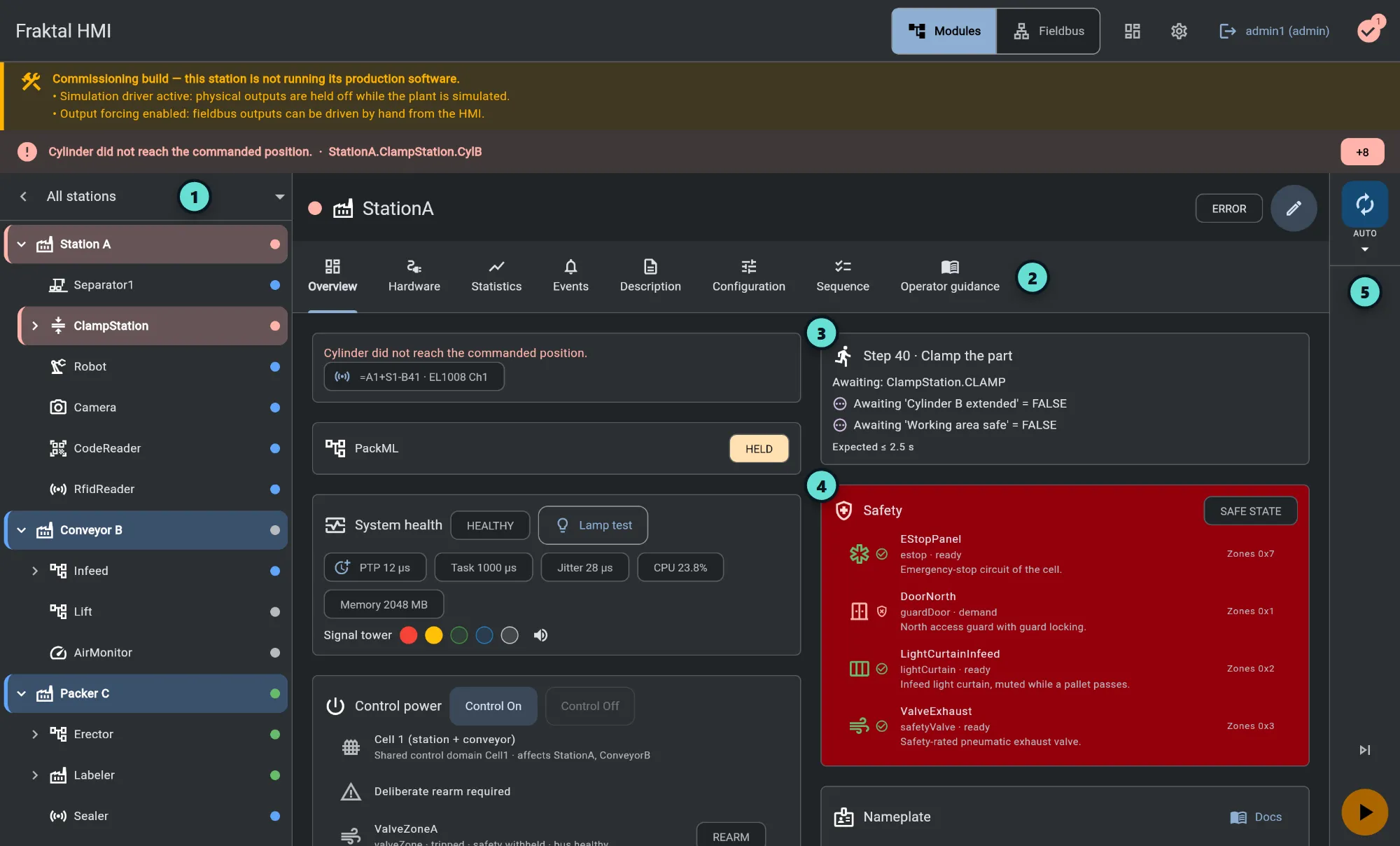
- The module tree, tinted along the event path.
- The module’s tabs, which an administrator can arrange.
- The current step and the conditions it waits for.
- Safety: a guard-door demand, so the cell is in its safe state.
- The mode rail: mode, step-by-step and start.
a1163c7 · try it- Forest (§3.1a): three roots —
StationA(clamp and inspect),ConveyorB(transfer) andPackerC(case packer) — with a Unit inside a Unit (PackerC.Labeler, §3.1). Every module type carries a §7.1 type key. - Sequences (§3.13, §6.5, §6.9, §6.12): every chain runs on one engine
(
lib/data/sim_sequence.dart), so the flow chart, the current step, the cycle Gantt, trend and Pareto all come from the steps actually taken. Station A’s AUTO chain forks into two parallel legs, marks a handled code-reader retry as a §6.9(e) warning, stalls (pending) before it faults, and HOME and CHANGEOVER have chains of their own; CHANGEOVER waits for the operator, which opens the authored guidance. - A scripted plant (
SimTour, a 150 s loop): light-curtain muting, an air-pressure dip that starves the station, a tool-wear decision (§6.11), a lost conveyor heartbeat (Annex D, a stale §3.12 flag), and a cylinder jam with a guard opened and closed while it is freed. The jam latches until an operator reset — which clears the latch, never the condition — and the station then waits for Control On (§9.8) and Start; it never resumes on its own. - Alarms (§8.2–§8.10): event-path tinting, first-out with electrical I/O tags, MANUAL_RESET vs AUTO_RESET, §8.9 rationalization on every reason, shelving of shelvable reasons, a history ring with durations and audit entries.
- Performance (§8.5, §8.11): counters with rework, OEE with trend, shifts from a weekly line calendar with targets and closed-shift history, command timings per module.
- Hardware (§9.8, §8.12, §8.13, §10.5.1): certified safety mirrored read-only (muting, demand, reset required), a control domain shared by two roots with power groups that trip and need re-arming, controller and clock health (one controller deliberately unsynchronized), the signal tower and its lamp test, nameplates, and an EtherCAT tree whose channels are named by electrical tag, with a terminal identity mismatch.
- Device modules: robot (motion, part record, hold-to-run jog), vision camera, code reader and RFID reader, recognised from what they publish.
- Configuration (§3.8): model data per model, station data with §3.8d data
classes, line data owned by Station A and mirrored by Conveyor B, parameter
sets, model creation, durability (
restoreLost/persistFailed). - Commissioning build (§7.5): the demo declares its simulation and
output-forcing gates, which is what makes fieldbus outputs forceable at all;
SimRepository(commissioning: false)is a production-like build. - §7.7 access: fully-open PLC policy by default, editable from the panel;
login (
op1/1111,tech1/4711,eng1/9999,admin1/2468); controls grey below threshold; ADMIN can edit the local Unit assignment; theme changing is level-gated HMI config (HmiConfig.themeMinLevel, default open).
Honest status
Section titled “Honest status”Verified against Flutter 3.47.5 (2026-09-28 — the pinned SDK; pubspec.lock cannot
resolve on an older one): flutter analyze clean, 591 tests passing with 12
intentional live-environment skips (flutter test),
and flutter build web succeeds. The suite is offline by design — SimRepository and
fakes, no PLC, no ADS, no network; anything needing hardware lives in tool/probe_*.dart
and is deliberately not run. tool/screenshots/*_test.dart render the demo to
PNG and are also not part of the suite (run them by path). Enum ordinals in lib/domain/types.dart are the PLC
contract (must match the Core DUTs); plc_lint rule E1 checks that parity on every
commit, and they remain the first thing to verify against a real server.
Appearance themes
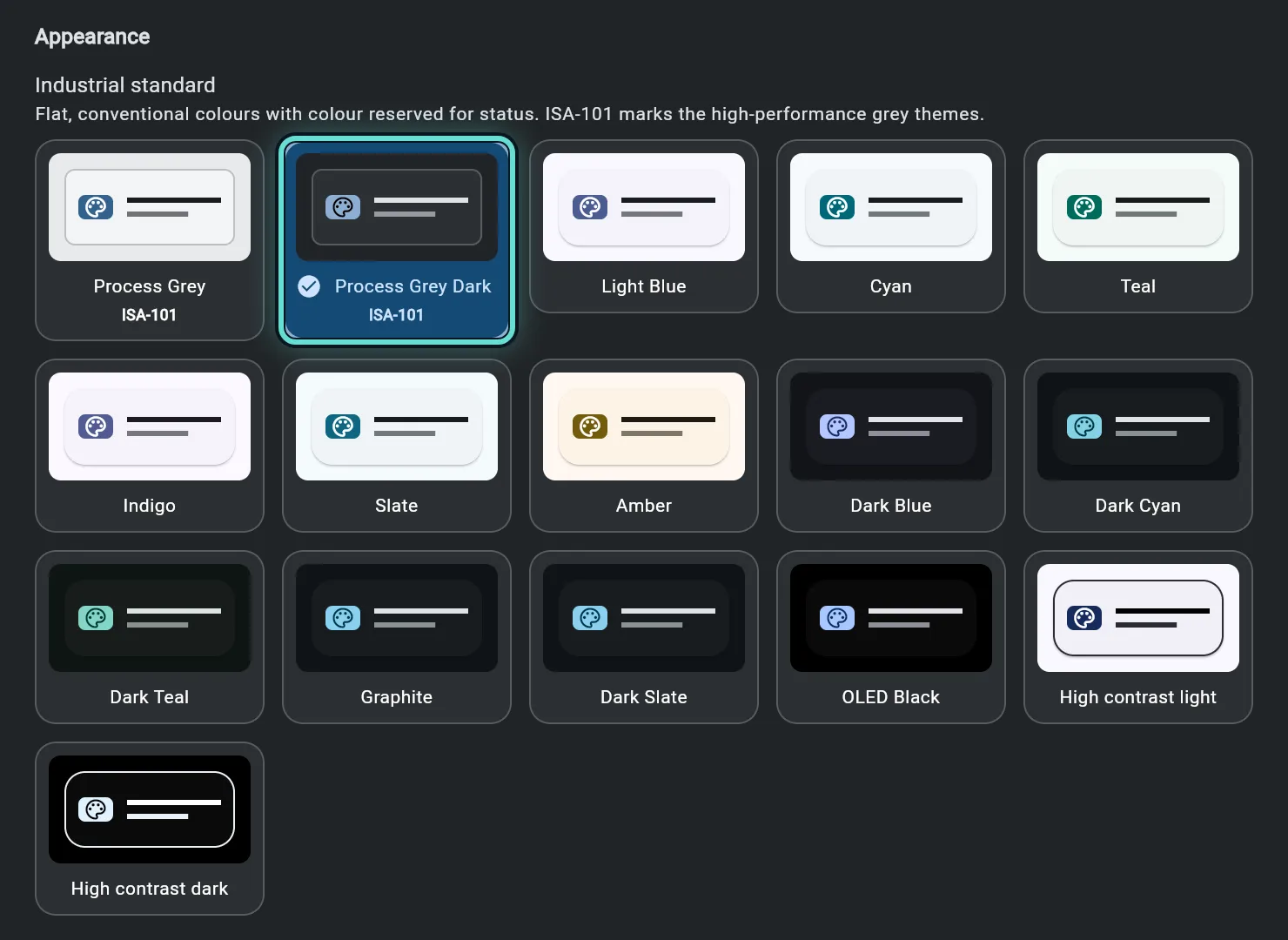
Section titled “Appearance themes”Settings → Appearance and the setup wizard share a material-preview picker. The original theme indices are unchanged; additional themes are appended so saved panel selections remain stable.
a1163c7 · try it| Collection | Themes | Treatment |
|---|---|---|
| Neon | Neon Cyan, Neon Violet | Luminous edges, restrained glow, dark grids, monospace type |
| Liquid glass | Pearl Glass, Midnight Glass | Clipped backdrop blur, translucent panels, directional lens rims |
| Reference 1 | Aether Blueprint | Teal drafting grid, aqua glow, brass outlines |
| Reference 2 | Vital Protocol | Navy console, mint edges, coral decorative accent |
| Reference 3 | Copper Patina | Dark patinated green, copper controls and polished edges |
| Reference 4 | Folded Sand | Warm paper, beveled panels, directional shadows |
| Reference 5 | Ivory Teal | Ivory raised surfaces, soft paired shadows, teal controls |
| References 6–7 | Lavender Cloud, Mint Cloud | Pastel soft surfaces; two variants of the repeated dashboard image |
| Gradient glass study | Coral Dusk | Dark translucent glass over a coral-to-teal wash, lit tab pill |
| Dark dashboards | Midnight Console | Borderless slate panels, top-edge catch light, vignette, teal accent |
| ANSI/ISA-101 | Process Grey, Process Grey Dark | Flat neutral grey, desaturated steel accent, colour left to status; a deeper alarm red keeps HIGH text AA on the grey |
| Industry inspired | Industry-inspired theme | Multicolor top strip, white/light-grey content, dark navigation, cyan selection, square blue controls and underline tabs |
The picker shows three groups: Industrial standard (the ISA-101 greys first
and badged), Modern (decorated finishes), and Industry inspired (reference
interfaces with their own shell chrome). FraktalThemeSpec.group derives the
collection from the surface finish and optional FraktalChromeTheme. Only the
display order changes; selections keep their persisted kThemes index.
Choose Settings → Appearance → Industry inspired and choose the theme listed there, or select the same theme in the setup wizard. Its static multicolor strip stays visible across operator screens and settings. The dark tree has its own contrasting status shades; PLC status colours and permission gates retain their semantics.
Its active-event bar uses solid red, dark gold and blue with white message text. The module tree, detail header and overview share type-specific device symbols; hardware, safety and control-power icons follow their published kinds. Unknown types retain a device fallback. Clock quality now distinguishes unavailable telemetry from a measured unsynchronized clock. See the clock-quality diagnosis for the TwinCAT and Allen-Bradley commissioning gaps behind persistent warnings. Square controls retain the selected touch-size preset. Larger presets use wider overview cells and, on narrow screens, a More menu for view/settings actions so the connection, login and global reset controls still fit.
Every decorated finish also paints a reflection sheen on its panels (under
the content, never over text), and the luminous finishes a lit inner line with a
halo-and-bloom glow; the blueprint backdrop is a two-weight drafting grid, and
luminous/console backdrops carry a vignette. The selected tab is a lit pill on
the luminous, glass and console finishes. test/theme_material_test.dart
measures panel text against the panel as painted (glass over the backdrop, then
the sheen) and test/theme_contrast_test.dart the selected tab on its pill.
FraktalSurfaceTheme is a Flutter ThemeExtension; FraktalCard and
FraktalBackdrop apply it across setup, standard facets and custom module cards.
Material retains input, focus, hover, disabled-state and touch-size behavior.
Glass blur is clipped to each panel, backgrounds are static, and the platform’s
reduced-animation preference substitutes opaque panels without blur. These
treatments use Flutter SDK primitives and add no package dependencies.
Add future material tokens in ui/app_theme.dart, use FraktalCard for panels,
and extend test/theme_material_test.dart plus the contrast gates below.
Status colours and contrast
Section titled “Status colours and contrast”The §8.1 status semantics are fixed across all selectable themes (READY/BUSY/DONE/
ERROR/ABORTED, HIGH/MEDIUM/LOW) — but the shade is not, because the same
colour is not legible on a light card and a dark one. Each semantic therefore
has three forms in ui/app_theme.dart:
| Use | API | Held to |
|---|---|---|
| Glyph — dot, icon, border | stateColor · severityColor · okColor / warningColor / infoColor |
3:1 (WCAG non-text) |
| Sentence — banner, message | severityTextColor |
4.5:1 |
| Filled area under white text | kOkFill / kWarningFill / kInfoFill, timeClassColor |
white-on-fill |
Getting this wrong is invisible in review and obvious on a panel: the single
light-card constants used before measured ~2:1 as a dot on a dark card, so the
module header’s state indicator, the tree dots and the link/release icons simply
were not there. Two more rules follow from the same failure — never write a bare
TextStyle(fontSize: …) (it carries no colour and inherits whatever ambient
DefaultTextStyle applies), and any widget painting a *Container role or a
fixed fill must pair it with foregroundOn / onContainer.
test/theme_contrast_test.dart measures the palette against the tinted
surface each indicator is drawn on. test/rendered_contrast_test.dart goes
further and is the one that catches real defects: it boots the whole shell in
every theme and checks each glyph the app actually paints against the fill it
actually lands on. A correct palette is not enough — a widget can paint one of
those fills and still forget to pair its foreground with it, which is exactly
how the Modules/Fieldbus selector, the tree’s expand chevron and the machine’s
STOP button each went invisible. Extend these rather than eyeballing a
screenshot.
Widget set & annex coverage
Section titled “Widget set & annex coverage”The HMI is generic: it renders whatever a module publishes. The annexes are PLC worked examples, not screens — but several publish typed data the detail view surfaces automatically (a facet card appears only when its data is present):
| Annex | Publishes | HMI widget |
|---|---|---|
| A Separator CM · B Clamp EM | Status/state/first-out | tree tile + Status strip (all modules) |
| C Station Unit | mode, model, counters, stall | Unit controls + cycle profile |
| D External device link | Linked/LastSeen/LinkReason |
LinkCard |
| E Traceability/MES | ST_PartContext/Verdict/ST_MeasRecord |
PartCard (verdict + measured records vs limits) |
| F PackML profile | E_PackMLState |
PackMLCard |
| G Motion · I Robot | actual/target position, velocity, homed | MotionCard |
| H TcUnit | (test-only — no runtime HMI) | — |
Standalone views from the standard’s HMI clauses:
- Cycle profile (§8.11.4):
cycle_profile_view.dart— waterfall coloured by time class, header split Total / Work (real cycle time) / Wait. - Config editor (§3.8a):
config_and_history.dart— ParCfg vs StationCfg grouped; edit gated byDATA_WRITE, re-checked in PLC. - History browser (§8.3): filterable by kind, durations, reset class.
- Decision prompt (§6.11): typed request, answer written back.
All facet/view data is defined in lib/domain/types.dart as optional classes;
the sim populates representative values so every widget is exercisable now.
HMI-completeness pass (audit-driven)
Section titled “HMI-completeness pass (audit-driven)”A coverage audit against the contract and common HMI patterns added:
- Plant overview (
overview_and_indicators.dart) — dashboard-first landing: one card per root (state, model, mode, counters, worst severity). Tap to drill in; the app-bar dashboard icon / title returns here. - Current-step card (§6.5/§6.9) — live StepNo/name, awaiting-label, failing named conditions, STARVED/BLOCKED chips, expected time. Answers “what is it doing right now”.
- Step Pareto (§8.11.4
StepStats) — per-step Avg bars (worst-first) with a Max marker, complementing the waterfall. - Global alarm banner — the single worst active event across the whole forest, visible from every screen; tap selects the source (standard safety pattern).
- Connection chip — transport liveness (Live/Connecting/Stale/Offline); an HMI must never present data of unknown freshness.
- Responsive layout — persistent left tree ≥900px; below that it becomes a Drawer (phone/Android portrait). Same code, all four platforms.
Deliberately out of scope here (deployment/next)
Section titled “Deliberately out of scope here (deployment/next)”Automated CA enrollment/renewal UI, bundled reverse-proxy authentication,
Linux/Android native HMI runner packaging, and long-horizon historian storage
remain deployment work. The gateway already accepts provisioned OPC UA client
certificate/key/trust material, serves the Web HMI, and native clients can use
ws:///wss://. OEE
recent-history visualization and alarm shelving are implemented against
the bounded PLC mirrors; external retention still belongs to the historian.
Fieldbus topology view (Core §10.5.1 / TC3 §10.6)
Section titled “Fieldbus topology view (Core §10.5.1 / TC3 §10.6)”A second tree beside the module tree (app-bar Modules/Fieldbus toggle): the physical bus — master → couplers → terminals/drives — auto-detected from the fieldbus master’s diagnostics on a real transport (EtherCAT/ADS, TC3 §10.6).
- Node status colouring: OP = neutral, SAFEOP/PREOP/link-warn = amber, FAULT/OFFLINE = red; worst-in-subtree tints ancestors (same rule as the module tree).
- I/O panel per node: every digital channel as ON/OFF, every analog as value + unit, with direction, quality, and forced flags. Each channel carries the browse path back to the owning module (§4.8), so a bus fault and a module first-out are two lenses on one event.
- Sim reflects the same fault as the module tree: when CylB errors, its EL1008
DI terminal goes FAULT and its coupler drops to SAFEOP — demonstrating the
cross-view diagnosis. Channel forcing (implemented): the first real manual-function write. A pin
button on each channel (visible only at MANUAL level, §7.7) opens a confirm dialog
(digital ON/OFF or analog value); the force is applied through
forceChannel, re-checked in the repository, reflected as a FORCED flag on the channel, and logged as a §8.3 event. Below MANUAL the button is a lock icon. This is the write-surface pattern for every future manual function.
Enum ordinals (NodeState, ChannelDir, ChannelKind) mirror the PLC DUTs
E_NodeState/E_ChannelDir/E_ChannelKind — verified against them.
Built from FraktalCore/HMI/README.md at revision a1163c7 of the Fraktal repository.